Table of Contents
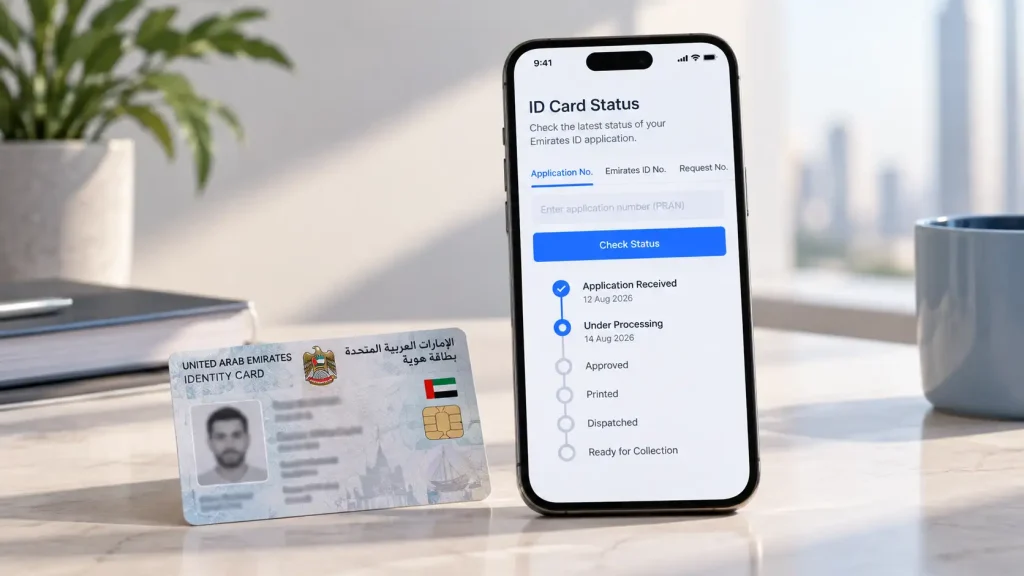
You can check your Emirates ID status for free, in under a minute, on the ICP ID Card Status page. Enter your Application Number (PRAN), your existing Emirates ID number, or your request number, and the portal shows exactly where your card is in the process.
This works whether you are tracking a new application, a renewal, or a replacement, and no login is required. Here’s your one-stop guide to every part of the process.
What an Emirates ID Status Check Shows
A status check confirms where your application sits (received, processing, printed, dispatched) It does not show whether a card or visa is still valid: residence file validity is a separate ICP service, File Validity.
How to Check Status on the ICP Portal
The Federal Authority for Identity, Citizenship, Customs & Port Security (ICP) runs the only official tracking system. Three reference numbers work, depending on what you have.
By Emirates ID Number
Tracking a renewal or replacement? Enter your existing 15-digit Emirates ID number on the ID Card Status page.
By Application or PRAN Number
For a new application, use the PRAN from your typing centre or free zone PRO receipt (ICP’s FAQ says the tracking number starts with 010). Enter it in the same field.
By Passport Number
New residents who don’t have their PRAN or Emirates ID yet can check their residence file instead. Go to ICP Smart Services, select Public Services, then File Validity, and enter your passport number, expiry date, and nationality exactly as printed. This shows the residence file status, not the card’s production stage.
How to Check in the UAEICP App
The UAEICP app mirrors the website. Download it from the App Store or Google Play, log in with UAE Pass, and enter your PRAN or Emirates ID number under ID Card Services.
Once your status reaches Approved, a valid digital Emirates ID appears in the app immediately, well before the physical card arrives.
What Each Status Message Means
Rejected: The application was declined; contact ICP for the reason
How to Check and Pay Emirates ID Fines
ICP allows a 30-day grace period after your card expires. After that, a late fine of AED 20 per day applies, capped at AED 1,000, per the official Emirates ID page. This is separate from the AED 50 per day overstay fine that applies if your residency visa has lapsed.
Check and settle both through the ICP fines payment service or the UAEICP app. In practice the fine is settled together with the renewal fee.
What to Do If Your Status Is Delayed (Helpline, SMS)
ICP sends SMS updates as your application progresses, so keep your registered mobile number current. If status hasn’t moved beyond ICP’s five-working-day service standard, or shows “Record Not Found,” call ICP on 600 522222 (or +971 600522222 from outside the UAE) with your PRAN ready.
“Record Not Found” is usually a formatting issue: check that you are entering the PRAN in the request number field, or the full 15-digit Emirates ID number without spaces, since the two aren’t interchangeable.
For anything unresolved by phone, visit an ICP Customer Happiness Centre in person.
How SPC Free Zone Helps
Emirates ID applications only move once the underlying residency visa is in order, which is where most avoidable delays happen. SPC Free Zone’s business setup team handles Emirates ID and visa processing for members directly, so applications go in correctly the first time.
For related reading, see SPC Free Zone’s guides on Emirates ID renewal for expats, getting a digital Emirates ID, and the UAE Unified Number, often the missing piece when a passport-based check fails.
For setup or renewal questions, reach the team right here.
Questions about your setup?
Tell us where your application is stuck and our team will point you to the right fix.
Frequently Asked Questions
Why does my status check say “Record Not Found” even though I definitely applied?
You’re likely entering the wrong number type. Try your Emirates ID number instead of your PRAN, or vice versa.
Can I check the status of a family member’s Emirates ID on my own account?
Yes, if you sponsored their application. Their PRAN or Emirates ID number works the same way as your own.
My card shows “Ready for Collection.” How long will Emirates Post hold it?
90 days from the arrival SMS, after which it’s returned to ICP for redelivery or collection.
Does a digital Emirates ID in the app count as valid without the physical card?
Yes, for most purposes. Once your status shows Approved, the digital version in the UAEICP app or UAE Pass is legally valid.
I am renewing late. Will the fine show up automatically when I check status?
Not always. The status check shows processing stage, not fines owed. Check the fines payment service separately before you pay.